
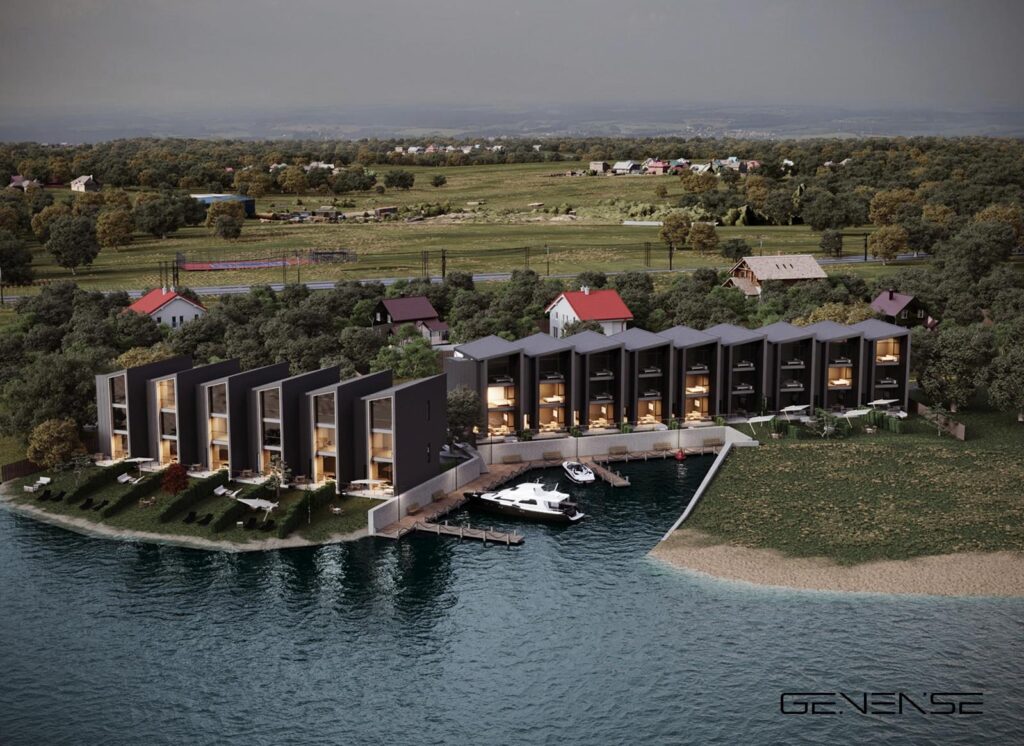
Architectural proposals rarely live in a vacuum. A new façade must sit convincingly within an existing streetscape, respond to real daylight, and read correctly at street level for people who will never open a CAD file. That communication gap is exactly why architectural photomontage remains one of the most effective visualization formats in architecture, development, and public review.
In practice, the technique merges a precisely built 3D model with an on-site photograph, so decision-makers can evaluate scale, massing, materials, and context in a single frame. When the goal is public trust and fast alignment across stakeholders, many teams choose professional 3D architectural photomontage services delivered by GENENSE to present design intent with credible realism, clean compositing, and context that feels familiar to viewers.
Introduction to Architectural Photomontage
An architectural photomontage is a context-based image where a proposed building is inserted into a real photograph of its future location. Unlike a standalone CGI render on a neutral background, the montage is judged by realism: perspective match, camera height, horizon alignment, atmospheric depth, and shadow logic must feel consistent with the original shot.
Before modern workflows, architecture photomontage was often assembled as a manual collage—sketch overlays on printed photos for planning packages or client boards. As rendering engines and compositing tools matured, photomontage architecture became a disciplined production pipeline that connects design documentation to persuasive, real-world visual proof.
How Architectural Photomontage Works
A believable montage is not “a render dropped into Photoshop.” It is a controlled process where every technical choice supports credibility in the final frame.
First, the team captures or receives high-resolution photography of the target viewpoint. Lens data, camera height, and orientation matter, since mismatched focal length is one of the fastest ways to break realism. Next, a 3D model is prepared from the project’s BIM/CAD information, then positioned to match the photo’s perspective. Lighting and shadow behavior are calibrated to the actual environment: sun angle, ambient fill, seasonal haze, and reflected color from nearby surfaces.
Compositing and grading follow, where edges are integrated, contrast is balanced, and environmental cues—reflections, occlusion, light wrap, subtle atmospheric perspective—help the proposal “sit” in the scene instead of floating. The image should feel like it could have been photographed on-site after completion.

Tools and Software Commonly Used
High-quality photomontage relies on a combination of modeling, rendering, and compositing workflows. Most teams use a toolkit that supports accuracy, physical lighting behavior, and clean post-production control.
Typical architectural visualization tools include 3D modeling software for geometry and camera matching, physically based render engines for believable light transport, and professional compositing suites for integration and grading. What matters is not the brand name of the software, but the discipline in how it is used: correct scale, credible materials, and coherent lighting across real and virtual elements.
Why Designers Rely on Photomontage
Design teams use photomontage architecture because stakeholders evaluate architecture emotionally and contextually, even when they claim to be “data-driven.” A single well-matched montage can answer questions that otherwise require lengthy explanation.
Designers lean on this method to:
- Reduce ambiguity during client and investor reviews
- Improve public understanding in consultations and hearings
- Support planning narratives around massing, streetscape rhythm, and material tone
- Validate sightlines, view corridors, and perceived scale at pedestrian level
- Align internal teams when drawings and BIM views trigger conflicting interpretations
The goal is not to “beautify” a proposal, but to clarify it—so the discussion shifts from confusion to concrete feedback.
Enhancing Public Presentations and Approval Conversations
Planning bodies often assess more than compliance; they examine how a proposal contributes to the built environment. An effective montage helps reviewers and communities evaluate impact without guesswork. Neighbors can understand what changes from their viewpoint. Committees can judge skyline influence, street-level presence, and relationship to adjacent structures.
In urban planning visualization, that clarity can prevent misunderstandings that slow approvals. Instead of reacting to abstract diagrams, audiences respond to a scene that looks familiar and readable. A credible montage becomes a visual anchor during Q&A, allowing project teams to explain intent with confidence and precision.
Use Cases in Architecture and Urban Planning
Architectural photomontage is widely used where context influences outcomes. In city planning design, it supports zoning discussions, density studies, streetscape improvement proposals, and redevelopment packages. During public hearings, a montage can show how a façade rhythm relates to neighboring buildings, how glazing reads at street level, or how landscape buffers affect perception.
The same approach is useful in:
- Architectural competitions, where juries evaluate contextual sensitivity
- Infrastructure projects, where bridges, stations, or corridors must be understood in place
- Landscape and environmental proposals, where planting and terrain changes require believable framing
- Mixed-use developments, where retail frontage and pedestrian experience are crucial
GENENSE structures photomontage deliverables around these practical use cases, tailoring viewpoints and realism level to the audience—board review, investor deck, or public exhibition.
The Role of Specialized Visualization Studios
Many teams can produce a montage; fewer can deliver one that withstands scrutiny from architects, planners, and the public. Perspective accuracy, shadow logic, and material realism are non-negotiable when an image is used to influence approvals or investment decisions.
GENENSE specializes in 3D photomontage rendering for architecture, aligning technical precision with design fluency. The studio’s process prioritizes:
- Camera matching that respects lens behavior and viewpoint credibility
- Material definition that reads correctly in real-world lighting
- Context integration that avoids “cut-out” edges and artificial contrast
- Clean deliverables optimized for presentations, submissions, and marketing
That’s why photomontage outputs from GENENSE are often used as decision-grade visuals rather than decorative illustrations.
Conclusion
Architectural photomontage is not a stylistic extra; it is a communication tool that places design intent into the real world people recognize. When context matters—and it usually does—montage imagery can shorten alignment cycles, reduce resistance, and support confident approvals.
If your team needs visuals that hold up in stakeholder meetings, public presentations, or planning reviews, order photomontage support from GENENSE and convert proposals into context-true images that help projects move forward.